Invite Only is a beginner challenge for SOC analysts. Extract insight from a set of flagged artefacts, and distil the information into usable threat intelligence.
Challenge description:
You are an SOC analyst on the SOC team at Managed Server Provider TrySecureMe. Today, you are supporting an L3 analyst in investigating flagged IPs, hashes, URLs, or domains as part of IR activities. One of the L1 analysts flagged two suspicious findings early in the morning and escalated them. Your task is to analyse these findings further and distil the information into usable threat intelligence.

Flagged IP: 101[.]99[.]76[.]120
Flagged SHA256 hash: 5d0509f68a9b7c415a726be75a078180e3f02e59866f193b0a99eee8e39c874f

We recently purchased a new threat intelligence search application called TryDetectThis2.0. You can use this application to gather information on the indicators above.
Questions:
1. What is the name of the file identified with the flagged SHA256 hash?
2. What is the file type associated with the flagged SHA256 hash?
3. What are the execution parents of the flagged hash? List the names chronologically, using a comma as a separator. Note down the hashes for later use.
4. What is the name of the file being dropped? Note down the hash value for later use.
5. Research the second hash in question 3 and list the four malicious dropped files in the order they appear (from up to down), separated by commas.
6. Analyse the files related to the flagged IP. What is the malware family that links these files?
7. What is the title of the original report where these flagged indicators are mentioned? Use Google to find the report.
8. Which tool did the attackers use to steal cookies from the Google Chrome browser?
9. Which phishing technique did the attackers use? Use the report to answer the question.
10. What is the name of the platform that was used to redirect a user to malicious servers?
NOTE: We could use both VirusTotal on the web or
TryDetectThis2.0(VirusTotal Offline, in VM). The screenshots contain both.
Tracing a Malware Kill Chain from Suspicious Indicators
(An Examination of Simulated Incident Response at TrySecureMe)
In the world of cybersecurity, raw data is just noise until you know how to translate it. This write-up examines a fascinating simulated incident response (IR) scenario. We were presented with two seemingly unrelated digital fingerprints: an IP address and a SHA256 hash that popped up during an investigation.
The goal was not just to identify these indicators, but to follow the entire threat lifecycle: turning isolated data points into comprehensive, actionable threat intelligence. By using various simulated threat intelligence platforms (VirusTotal), we were able to trace a complete, multi-stage malware attack! Let’s break down our findings step-by-step.
Phase I: Initial Indicator Triage (The SHA256 Hash)
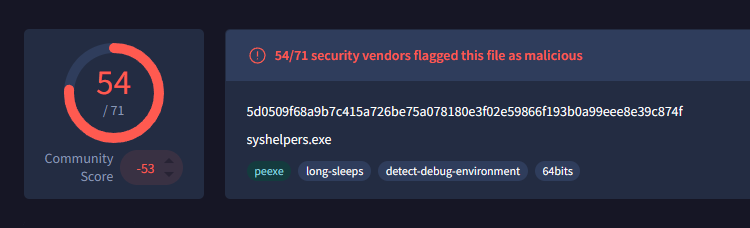
Our first target was the flagged file hash: 5d0509f68a9b7c415a726be75a078180e3f02e59866f193b0a99eee8e39c874f. A hash is like a unique digital fingerprint for a file, and by checking it against threat intelligence databases, we learned exactly what we were dealing with.
1. What is the name of the file identified with the flagged SHA256 hash?
The file was named syshelpers.exe. This immediately gave us a profile for the suspicious code.
2. What is the file type associated with the flagged SHA256 hash?
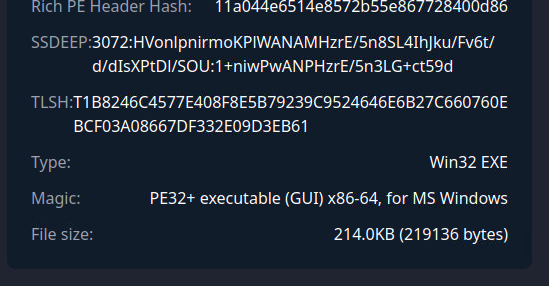
Based on our analysis of its details, we confirmed that it was a Win32 EXE file.
Next, we investigated how this piece of code was executed and what other malicious files it left behind.
3. What are the execution parents of the flagged hash? List the names chronologically.
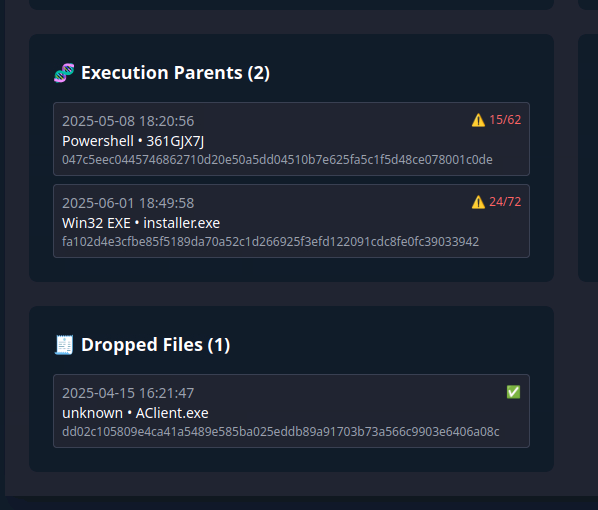
We found two potential execution parents that led to syshelpers.exe: 361GJX7J and installer.exe. Understanding these parent processes is crucial because it helps us trace the initial infection vector (the ‘how’).
Furthermore, we tracked down which file was initially dropped during this process.
4. What is the name of the file being dropped?
The first payload drop we observed was named AClient.exe.
Our most valuable forensic step was to trace the chain of execution from installer.exe. We found that this process dropped multiple follow-up malicious files, which are critical for understanding the full scope of the attack.
5. Research the second hash in question 3 and list the four malicious dropped files.
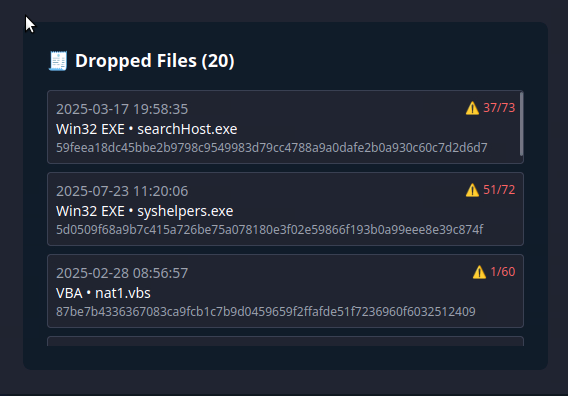
From the parent installer.exe, we identified a cluster of four additional suspicious drops: searchHost.exe, syshelpers.exe, nat1.vbs, and runsys.vbs. This tells us that this wasn’t just a single-stage attack; it was a multi-faceted payload delivery system.
Phase II: IP Analysis and Malware Identification
Moving on to the flagged Indicator of Compromise (IoC): the IP address 101[.]99[.]76[.]120. While an IP can be spoofed or used for many things, linking it to known malicious activity is key.
6. Analyse the files related to the flagged IP. What is the malware family that links these files?
When we ran the IP through our threat intelligence tools, the results were unambiguous. This specific IP address was strongly linked to the AsyncRAT malware family. AsyncRAT is a notorious remote access trojan (RAT) often used by cybercriminals for persistence and command-and-control (C2) activities.
Phase III: Threat Contextualization and Tactics (The “Why”)
Finally, we needed to put all these pieces together. The RAT family, the dropped files, and the specific IP address, to understand the attacker’s overall objective. We performed targeted searches using Google for related reports. This phase revealed not just what happened, but how and why.
7. What is the title of the original report where these flagged indicators are mentioned?
By searching for the IP address combined with “malware report,” we located a critical article detailing the full attack chain. The original report was titled: “From Trust to Threat: Hijacked Discord Invites Used for Multi-Stage Malware Delivery.”

Reading through this report provided answers to the attacker’s specific tactics and techniques (TTPs):
8. Which tool did the attackers use to steal cookies from the Google Chrome browser?
The malicious payload used a known exploit mechanism called ChromeKatz. This allowed them to bypass security measures and harvest sensitive data like user session cookies.
9. Which phishing technique did the attackers use?
The report highlighted that the attack utilised the ClickFix phishing technique, a technique in which the service initially appears broken, prompting the user to take manual action to “fix” it.
10. What is the name of the platform that was used to redirect a user to malicious servers?
The initial point of compromise and redirection was Discord. The attackers leveraged Discord’s invite system to trick users into thinking they were accessing safe content when, in fact, they were being redirected to their Command & Control (C2) infrastructure.
Conclusion: Lessons Learned
This investigation transformed two simple indicators (101[.]99[.]76[.]120 and the SHA256 hash) into a complete narrative of an attack kill chain. The threat actors used Discord as their initial vector, deployed a multi-stage payload delivered by AsyncRAT, and ultimately aimed to steal credentials using ChromeKatz.
By following our IR procedures, from basic hashing checks to deep contextual research, we were able to map out the entire threat model.